Forum RSS Feed Follow @ Twitter Follow On Facebook

Thread Rating:
  • 0 Vote(s) - 0 Average
  • 1
  • 2
  • 3
  • 4
  • 5
[-]
Welcome
You have to register before you can post on our site.

Username:


Password:


[-]
Latest Threads
【Mega】 Insta360 Promo Code "INRSGGA0RFK"...
Last Post: SDfdfg4567
Today 10:48 PM
» Replies: 0
» Views: 10
【Ultimate】 Insta360 Coupon Code "INRSGGA...
Last Post: SDfdfg4567
Today 10:46 PM
» Replies: 0
» Views: 4
【Unbeatable】 Insta360 Discount Code {INR...
Last Post: SDfdfg4567
Today 10:45 PM
» Replies: 0
» Views: 11
【Official】 Insta360 Promo Code【INRSGGA0R...
Last Post: SDfdfg4567
Today 10:43 PM
» Replies: 0
» Views: 4
【Special】 Insta360 Coupon Code【INRSGGA0R...
Last Post: SDfdfg4567
Today 10:42 PM
» Replies: 0
» Views: 1
【Best】 Insta360 Discount Code【INRSGGA0RF...
Last Post: SDfdfg4567
Today 10:41 PM
» Replies: 0
» Views: 7
【Verified】 Insta360 Promo Code [INRSGGA0...
Last Post: SDfdfg4567
Today 10:39 PM
» Replies: 0
» Views: 19
Insta360 Discount Code “INRSGGA0RFK” – U...
Last Post: SDfdfg4567
Today 10:38 PM
» Replies: 0
» Views: 16
Insta360 Drone Coupon Code “INRSGGA0RFK”...
Last Post: SDfdfg4567
Today 10:37 PM
» Replies: 0
» Views: 18
Insta360 Camera Deals with Code “INRSGGA...
Last Post: SDfdfg4567
Today 10:36 PM
» Replies: 0
» Views: 17
Insta360 GO 3 Coupon Code “INRSGGA0RFK” ...
Last Post: SDfdfg4567
Today 10:34 PM
» Replies: 0
» Views: 8
Insta360 Cameras Coupon Code “INRSGGA0RF...
Last Post: SDfdfg4567
Today 10:33 PM
» Replies: 0
» Views: 16
Insta360 Ace Pro 2 Coupon “INRSGGA0RFK” ...
Last Post: SDfdfg4567
Today 10:32 PM
» Replies: 0
» Views: 20
Insta360 X5 Essentials Bundle Coupon “IN...
Last Post: SDfdfg4567
Today 10:30 PM
» Replies: 0
» Views: 22
Insta360 Flow 2 Pro Coupon “INRSGGA0RFK”...
Last Post: SDfdfg4567
Today 10:29 PM
» Replies: 0
» Views: 18
Insta360 Ace Pro 3 Coupon Code “INRSGGA0...
Last Post: SDfdfg4567
Today 10:28 PM
» Replies: 0
» Views: 22
Insta360 GO 2 Promo Code “INRSGGA0RFK” –...
Last Post: SDfdfg4567
Today 10:27 PM
» Replies: 0
» Views: 16
Insta360 GO 3S Coupon Code “INRSGGA0RFK”...
Last Post: SDfdfg4567
Today 10:26 PM
» Replies: 0
» Views: 23
Insta360 Camera Deals with Code “INRSGGA...
Last Post: SDfdfg4567
Today 10:24 PM
» Replies: 0
» Views: 7
Insta360 Link 2C Promo Code “INRSGGA0RFK...
Last Post: SDfdfg4567
Today 10:23 PM
» Replies: 0
» Views: 28

Request: EVGA 790i Ultra Xeon Support
#1
I am requesting support for the Xeon E5405 (Harpertown) be added to the EVGA 790i Ultra motherboard.

BIOS Link: ftp://ftp.evga.com/bios/NF79P09.bin

What Happens: After removing my Pentium D and installing the Xeon E5405 it boots into Windows just fine. However, upon reboot I get post code "AA" on the motherboard display and no post at all on the monitor. I have to reinstall the Pentium D, let it POST, and then reinstall Xeon to get it to boot again. Same thing occurs if I install Xeon, and enter BIOS (instead of loading Windows) and exit with saving (even without changing anything). If I exit without saving it just reboots again like normal, no "AA".

AIDA64 Picture:
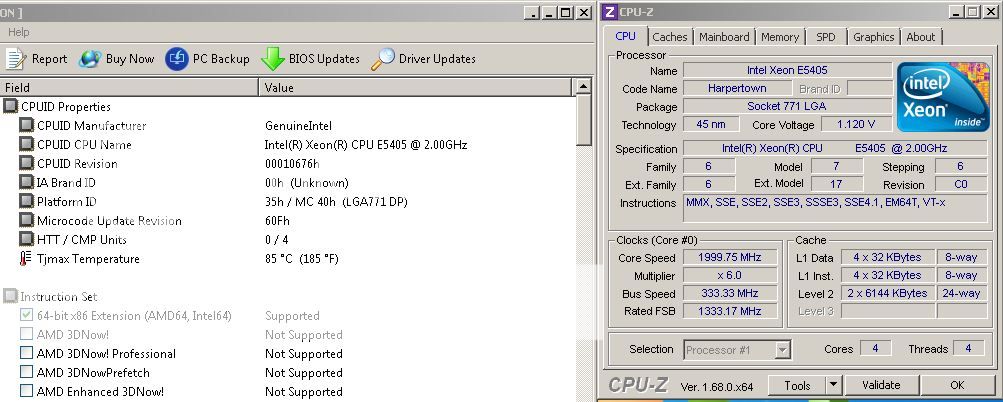
[Image: XeonE5405UpdatedMicrocode.jpg]

Processor: Xeon E5405
http://www.cpu-world.com/CPUs/Xeon/Intel...405A).html
CPU Spec Code: SLAP2
Picture of CPU: [Image: GEDC00032.jpg]

Notes: BIOS P09 was chosen instead of P10 because P09 allows the use of 16GB of memory where P10 is limited to 8GB.
find
quote
#2
I have added xeon 771 microcode to the bios(It is a award bios).
It is cab be used 771 e54xx or l54xx c0 and e0 step cpu.(like e5450、e5440、l5420.....)
Try it !


Attached Files
.rar   NF79P09.rar (Size: 546.64 KB / Downloads: 27)

find
quote


Forum Jump:


Users browsing this thread: 1 Guest(s)