|
Welcome
|
You have to register before you can post on our site.
|

|
|
How do I force flash bios to different model?
|
Posts: 28
Threads: 1
Joined: Jun 2019
Reputation:
0
(06-14-2019, 11:48 AM)Lost_N_BIOS Wrote: They are incompetent, we've established that much already..... Unless, it's like I said, and they switched out motherboards on you and didn't say they did that, this would explain their answer so you may want to press for exact details of why they say that or what they actually did to your system.
If you want to laugh at them, ask them how they didn't kill the board then by programming in the incorrect BIOS for your model?  And additionally, why they programmed in the partial BIOS update from the web, instead of building a full proper BIOS region with all NVRAM volumes. This is lazy or incompetent, probably both, but many places do that because it's the easy way out - but flashing in the wildly different model there is no excuse for and gives them no room to try and tell you that you can't fix it or you will break it Unless they did switch out the motherboard on you.
Or, you can give me images from all the stickers on your motherboard and we can look it up and see if it's the model used in your correct system or not.
Yes, you have correct ME System tools 9.1 and thanks for the dump (x64 stuff not needed here). Thanks for the BIOS region dump, I will switch out the vBIOS rom for you later, but first need to see your error (if any) when you try to write back your dumped BIOS region as mentioned in my original post about this, it's last FPT command I gave you.
I just realized that I missed the write part. It fails.
Code: FPTw.exe -bios -f biosreg.bin
Intel (R) Flash Programming Tool. Version: 9.1.10.1000
Copyright (c) 2007 - 2014, Intel Corporation. All rights reserved.
Platform: Intel(R) HM86 Express Chipset
Reading HSFSTS register... Flash Descriptor: Valid
--- Flash Devices Found ---
W25Q64BV ID:0xEF4017 Size: 8192KB (65536Kb)
Error 280: Failed to disable write protection for the BIOS space!
Posts: 1,775
Threads: 0
Joined: Aug 2018
Reputation:
42
06-16-2019, 10:50 PM
(This post was last modified: 06-16-2019, 10:50 PM by Lost_N_BIOS.)
Thanks. Please put system to S3 sleep for one minute, then wake it up and try the FPT flash again. Do you then get success, or same error?
If same error, please see my guide here, you can start at step 6 as I've gathered the variables for you already
https://www.win-raid.com/t3908f16-GUIDE-...-BIOS.html
Rename your .efi file to >>> Shellx64.efi
You will be disabling two locks, BIOS Lock and SMI Lock
SMI Lock >>> 0xA8
BIOS Lock >>> 0xA9
So, at grub prompt, you'll type the following one at a time, then reboot to windows and try the FPT flash again
setup_var 0xA8 0x0
setup_var 0xA9 0x0
Posts: 28
Threads: 1
Joined: Jun 2019
Reputation:
0
06-16-2019, 11:03 PM
(This post was last modified: 06-16-2019, 11:20 PM by rinaldojonathan.)
(06-16-2019, 10:50 PM)Lost_N_BIOS Wrote: Thanks. Please put system to S3 sleep for one minute, then wake it up and try the FPT flash again. Do you then get success, or same error?
If same error, please see my guide here, you can start at step 6 as I've gathered the variables for you already
https://www.win-raid.com/t3908f16-GUIDE-...-BIOS.html
Rename your .efi file to >>> Shellx64.efi
You will be disabling two locks, BIOS Lock and SMI Lock
SMI Lock >>> 0xA8
BIOS Lock >>> 0xA9
So, at grub prompt, you'll type the following one at a time, then reboot to windows and try the FPT flash again
setup_var 0xA8 0x0
setup_var 0xA9 0x0
It returns exact same error. Wait while I'm rebooting and trying the next thing.
EDIT : the grub edit part went fine. but then it still returns same error.
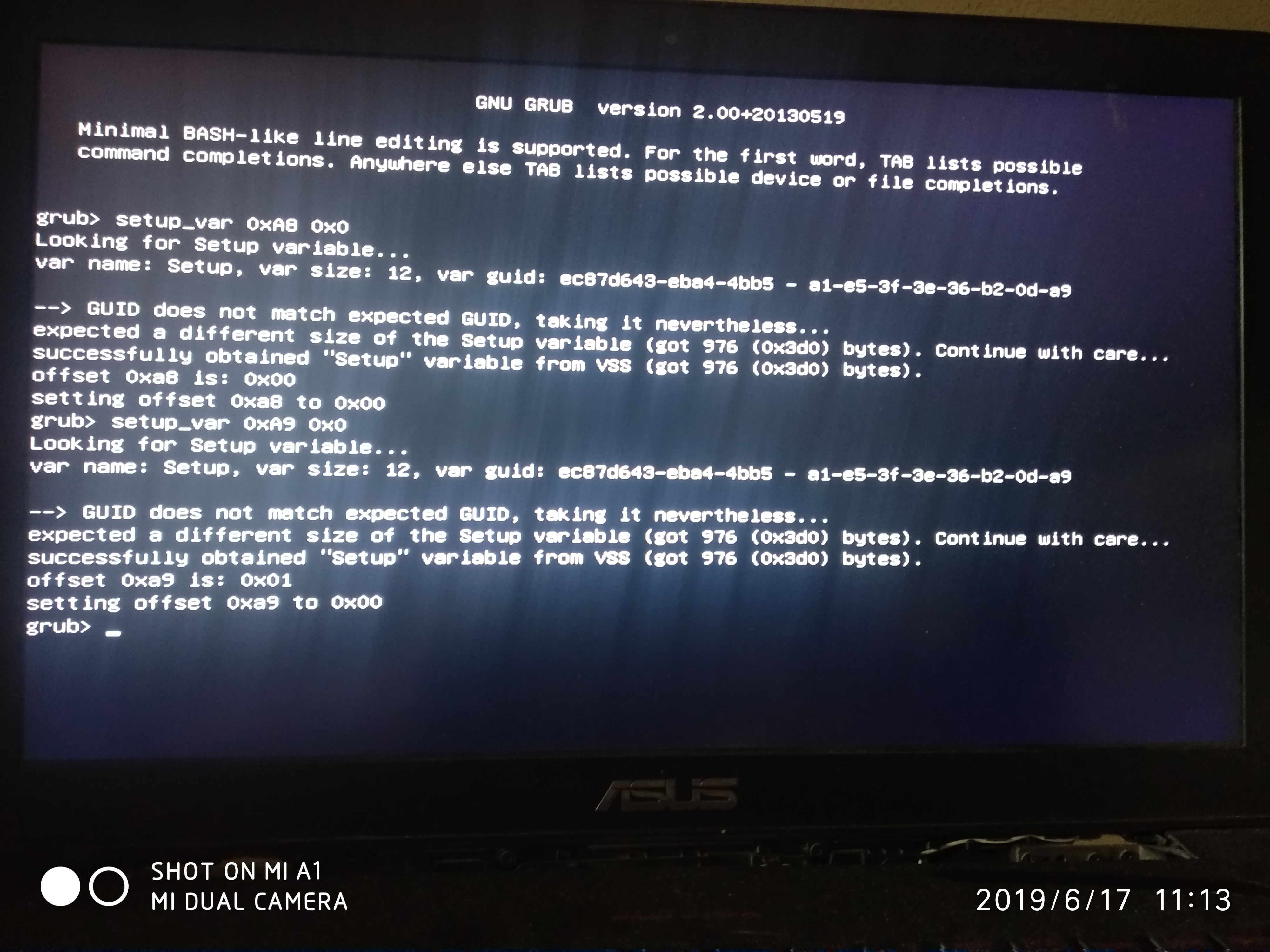
Code: FPTw.exe -bios -f biosreg.bin
Intel (R) Flash Programming Tool. Version: 9.1.10.1000
Copyright (c) 2007 - 2014, Intel Corporation. All rights reserved.
Platform: Intel(R) HM86 Express Chipset
Reading HSFSTS register... Flash Descriptor: Valid
--- Flash Devices Found ---
W25Q64BV ID:0xEF4017 Size: 8192KB (65536Kb)
Error 280: Failed to disable write protection for the BIOS space!
Posts: 1,775
Threads: 0
Joined: Aug 2018
Reputation:
42
Wow, please fix image, 600-800px would be fine for showing this
So, looks like SMI lock was already disabled.
Wait! Sorry, I forgot you had wrong BIOS on here!
Please set 0xA9 back to 0x1 (setup_var 0xA9 0x1)
Your current BIOS dumped from wrong system has different variables
SMI Lock >>> 0xA6
BIOS Lock >> 0xA7
So, now do these, then reboot and try again (Sorry about that!)
setup_var 0xA9 0x1
setup_var 0xA6 0x0
setup_var 0xA7 0x0
Posts: 28
Threads: 1
Joined: Jun 2019
Reputation:
0
(06-17-2019, 12:07 AM)Lost_N_BIOS Wrote: Wow, please fix image, 600-800px would be fine for showing this
So, looks like SMI lock was already disabled.
Wait! Sorry, I forgot you had wrong BIOS on here!
Please set 0xA9 back to 0x1 (setup_var 0xA9 0x1)
Your current BIOS dumped from wrong system has different variables
SMI Lock >>> 0xA6
BIOS Lock >> 0xA7
So, now do these, then reboot and try again (Sorry about that!)
setup_var 0xA9 0x1
setup_var 0xA6 0x0
setup_var 0xA7 0x0
hey it succeeded!
Code: C:\Users\Rinaldo\Downloads\Intel ME System Tools v9.1 r7\Flash Programming Tool\WIN32>FPTw.exe -bios -f biosreg.bin
Intel (R) Flash Programming Tool. Version: 9.1.10.1000
Copyright (c) 2007 - 2014, Intel Corporation. All rights reserved.
Platform: Intel(R) HM86 Express Chipset
Reading HSFSTS register... Flash Descriptor: Valid
--- Flash Devices Found ---
W25Q64BV ID:0xEF4017 Size: 8192KB (65536Kb)
PDR Region does not exist.
- Reading Flash [0x800000] 6144KB of 6144KB - 100% complete.
- Erasing Flash Block [0x22B000] - 100% complete.
- Programming Flash [0x22B000] 108KB of 108KB - 100% complete.
- Erasing Flash Block [0x230000] - 100% complete.
- Programming Flash [0x230000] 4KB of 4KB - 100% complete.
- Erasing Flash Block [0x233000] - 100% complete.
- Programming Flash [0x233000] 4KB of 4KB - 100% complete.
- Verifying Flash [0x800000] 6144KB of 6144KB - 100% complete.
RESULT: The data is identical.
FPT Operation Passed
what now?
Posts: 1,775
Threads: 0
Joined: Aug 2018
Reputation:
42
Great! Sorry again for the mixup on those variables.
What now..... I forget too, what are we doing? Ohh yes, switching Nvdia vbios for right now.
Did you order a programmer and cable yet? If not, get on it!! So we can later get you fully back onto the correct BIOS safely.
Flash via >> FPTw.exe -bios -f biosreg950.bin
http://s000.tinyupload.com/index.php?fil...3280927184
Posts: 28
Threads: 1
Joined: Jun 2019
Reputation:
0
06-17-2019, 04:31 AM
(This post was last modified: 06-17-2019, 04:47 AM by rinaldojonathan.)
(06-17-2019, 02:35 AM)Lost_N_BIOS Wrote: Great! Sorry again for the mixup on those variables.
What now..... I forget too, what are we doing? Ohh yes, switching Nvdia vbios for right now.
Did you order a programmer and cable yet? If not, get on it!! So we can later get you fully back onto the correct BIOS safely.
Flash via >> FPTw.exe -bios -f biosreg950.bin
http://s000.tinyupload.com/index.php?fil...3280927184
I don't have one! 
Is it safe to flash this one tho?
EDIT : I tried to flash, it returns error.
Code: fPTw.exe -bios -f biosreg950.bin
Intel (R) Flash Programming Tool. Version: 9.1.10.1000
Copyright (c) 2007 - 2014, Intel Corporation. All rights reserved.
Platform: Intel(R) HM86 Express Chipset
Reading HSFSTS register... Flash Descriptor: Valid
--- Flash Devices Found ---
W25Q64BV ID:0xEF4017 Size: 8192KB (65536Kb)
PDR Region does not exist.
- Reading Flash [0x800000] 6144KB of 6144KB - 100% complete.
- Erasing Flash Block [0x214000] - 100% complete.
- Programming Flash [0x214000] 12KB of 12KB - 100% complete.
- Erasing Flash Block [0x218000] - 100% complete.
- Programming Flash [0x218000] 4KB of 4KB - 100% complete.
- Erasing Flash Block [0x21A000] - 100% complete.
- Programming Flash [0x21A000] 4KB of 4KB - 100% complete.
- Erasing Flash Block [0x21D000] - 100% complete.
- Programming Flash [0x21D000] 8KB of 8KB - 100% complete.
- Erasing Flash Block [0x22E000] - 100% complete.
- Programming Flash [0x22E000] 60KB of 60KB - 100% complete.
- Erasing Flash Block [0x230000] - 100% complete.
- Programming Flash [0x230000] 4KB of 4KB - 100% complete.
- Erasing Flash Block [0x233000] - 100% complete.
- Programming Flash [0x233000] 4KB of 4KB - 100% complete.
- Erasing Flash Block [0x460000] - 100% complete.
- Programming Flash [0x460000] 1920KB of 1920KB - 100% complete.
- Verifying Flash [0x800000] 6144KB of 6144KB - 100% complete.
Error 204: Data verify mismatch found.
so I reflashed the original backed up BIOS.
Code: fPTw.exe -bios -f biosreg.bin
Intel (R) Flash Programming Tool. Version: 9.1.10.1000
Copyright (c) 2007 - 2014, Intel Corporation. All rights reserved.
Platform: Intel(R) HM86 Express Chipset
Reading HSFSTS register... Flash Descriptor: Valid
--- Flash Devices Found ---
W25Q64BV ID:0xEF4017 Size: 8192KB (65536Kb)
PDR Region does not exist.
- Reading Flash [0x800000] 6144KB of 6144KB - 100% complete.
- Erasing Flash Block [0x214000] - 100% complete.
- Programming Flash [0x214000] 8KB of 8KB - 100% complete.
- Erasing Flash Block [0x21A000] - 100% complete.
- Programming Flash [0x21A000] 4KB of 4KB - 100% complete.
- Erasing Flash Block [0x21D000] - 100% complete.
- Programming Flash [0x21D000] 8KB of 8KB - 100% complete.
- Erasing Flash Block [0x22B000] - 100% complete.
- Programming Flash [0x22B000] 48KB of 48KB - 100% complete.
- Erasing Flash Block [0x230000] - 100% complete.
- Programming Flash [0x230000] 4KB of 4KB - 100% complete.
- Erasing Flash Block [0x233000] - 100% complete.
- Programming Flash [0x233000] 4KB of 4KB - 100% complete.
- Erasing Flash Block [0x400000] - 100% complete.
- Programming Flash [0x400000] 1536KB of 1536KB - 100% complete.
- Verifying Flash [0x800000] 6144KB of 6144KB - 100% complete.
RESULT: The data is identical.
FPT Operation Passed
Posts: 1,775
Threads: 0
Joined: Aug 2018
Reputation:
42
Yes, safe to flash! I only mentioned programmer so we can safely swap you over to correct model BIOS without concerns.
Try flash from DOS instead, this is common issue sometimes.
Posts: 28
Threads: 1
Joined: Jun 2019
Reputation:
0
06-17-2019, 02:39 PM
(This post was last modified: 06-17-2019, 02:50 PM by rinaldojonathan.)
(06-17-2019, 01:58 PM)Lost_N_BIOS Wrote: Yes, safe to flash! I only mentioned programmer so we can safely swap you over to correct model BIOS without concerns.
Try flash from DOS instead, this is common issue sometimes. is it safe to ignore the Error 204? what does it mean exactly?
EDIT : I ignored the error, went to poweroff, then power on again, then my laptop wont boot.
Every time I power on the laptop, my hard drive clicks. I can hear it clicks almost every second now (reboot loop?) and the cpu indicator also blinks every reboot.
It doesnt even show the logo.
Aaarrrgggh now I feel stupid.
Posts: 1,775
Threads: 0
Joined: Aug 2018
Reputation:
42
Sorry to hear this, normally when you get that error, and you flash in stock FPT dump after that as you mentioned, then all is fine. I guess you wrote it again, but then didn't follow that by stock FPT dump write again after that, I should have reminded you to do this after each failed one.
You will need CH341A and SOIC8 test clip as initially mentioned you should get, now you'll have to get anyway and we can sort out your BIOS issues properly. Do not take the system back to those people that put on wrong BIOS, order the programmer and SOIC8 test clip with cable and wait until it arrives, we'll get it sorted out properly.
Don't feel stupid, it's not your fault, more my fault than anything, especially for not mentioning to always write stock after that FPT mod flash attempt failure. I assumed you'd left it alone after what you described above, failed write, then stock write, and that was it, which would have booted and been fine.. So it's my fault, not you!
Order programmer and SOIC8 test clips w/ cable, we'll sort it out! If you don't want long wait for China shipment, you can usually order from someone locally/closer to you on ebay for more $$, or if you are in USA you can get on Newegg or Amazon. If you are not in USA, many places sell these things, look around computer hardware stores you know of online and you should find.
|
Users browsing this thread: 5 Guest(s)
|