Forum RSS Feed Follow @ Twitter Follow On Facebook

Thread Rating:
  • 8 Vote(s) - 4.88 Average
  • 1
  • 2
  • 3
  • 4
  • 5
[-]
Welcome
You have to register before you can post on our site.

Username:


Password:


[-]
Latest Threads
[REQUEST] Acer Aspire 4930G BIOS Unlock
Last Post: BIUW
Today 01:16 AM
» Replies: 20
» Views: 6271
[REQUEST] Acer Predator Helios 300 PH315...
Last Post: FFNN
Yesterday 08:55 AM
» Replies: 44
» Views: 39994
[REQUEST] Lenovo T520 (8AETxxWW) Whiteli...
Last Post: zahaar
Yesterday 01:47 AM
» Replies: 149
» Views: 146276
Lenovo ThinkPad x130e 8RET54WW(V1.17) WH...
Last Post: nervtechdept
07-07-2026 03:49 PM
» Replies: 5
» Views: 5074
[REQUEST] Lenovo Thinkpad T540p (GMETxxW...
Last Post: Dudu2002
07-07-2026 01:23 PM
» Replies: 88
» Views: 67651
[REQUEST] Lenovo Yoga 500-14ISK (D3CNxxW...
Last Post: Dudu2002
07-07-2026 01:21 PM
» Replies: 5
» Views: 4746
[REQUEST] HP 15-bs000 (Intel) series BIO...
Last Post: gouthuuu
07-07-2026 11:43 AM
» Replies: 7
» Views: 9500
Foxconn H61MXE & Xeon
Last Post: Elmurley
07-07-2026 04:40 AM
» Replies: 2
» Views: 820
[REQUEST] Lenovo B490 (H1ETxxWW) Whiteli...
Last Post: samuelmenegatti
07-06-2026 01:56 PM
» Replies: 91
» Views: 65491
Lenovo Z470 Wifi Whitelist
Last Post: Schneider90210
07-06-2026 06:14 AM
» Replies: 25
» Views: 19667
[REQUEST] Clevo P751ZM (mobo P750ZM-G) B...
Last Post: EuReKa-LoS
07-04-2026 08:55 AM
» Replies: 5
» Views: 3568
Dell Inspiron 3910 BIOS Password Removal...
Last Post: 5518
07-02-2026 06:27 AM
» Replies: 0
» Views: 1274
Modded bios m3-581tg wont flash
Last Post: gazan
07-02-2026 06:15 AM
» Replies: 57
» Views: 52683
[Request] Rog g22ch Bios Unlock (PL1, pl...
Last Post: Echelon36
07-01-2026 08:21 PM
» Replies: 0
» Views: 1150
[REQUEST] Acer Aspire One D270 BIOS Unlo...
Last Post: StrasneQvirki
06-28-2026 01:56 PM
» Replies: 31
» Views: 33820
[REQUEST] Alienware M15 R7 i7-12700H BIO...
Last Post: Carl Camargos
06-28-2026 10:25 AM
» Replies: 0
» Views: 1271
Hp 8510w fix quad core support Q9000 in ...
Last Post: DeathBringer
06-28-2026 10:24 AM
» Replies: 11
» Views: 1848
[REQUEST] Lenovo Z50-70 & Z40-70 (9BCNxx...
Last Post: nir4w1
06-28-2026 10:05 AM
» Replies: 759
» Views: 455225
Acer E1-510 z5we3 bios
Last Post: dpdr
06-28-2026 07:56 AM
» Replies: 0
» Views: 1245
[REQUEST] Acer Predator Helios 300 PH315...
Last Post: Dudu2002
06-27-2026 05:11 PM
» Replies: 48
» Views: 39243

HP MCP61PM-HM (Nettle2) 5.27 With Unlocked Overclocking Options
Flashed my Bios using the guide and files in the OP. Everything is working great - thanks alot.

I read through this thread, and have seen some conflicting info on using Phenom II x4 processors. Currently I have a 32 bit system, and would really like to upgrade to a 64 bit system, mainly so I can get more then 3GB of Ram useable. Based on the posts here I'm just not sure: Can I use a Phenom II x4 840 processor with this new bios installed (it's 95W, AM3 socket)? If so, I'd definitely buy one, but I'm not going to drop $100 on something that probably wol't work.

Thanks for any info on this if anyone knows. And thanks again for the BIOS upgrade Smile
find
quote
Hi, I tried this bios mod successfully a few months ago and now I'm curious, how do I go back to the original hp bios? I've read most of the 67 pages of posts and glanced through the rest when my eyes started to glaze over, but I don't believe I saw it.
find
quote
Will this bios work with a HP Compaq Presario SG3309LA with a AMD Althon 64 X2 4050e my motherboard is a MCP61PM-HM (Iris8) ? Thanks!
please i need to know.
http://h10025.www1.hp.com/ewfrf/wc/document?docname=c01686489&lc=en&cc=us&dlc=en&product=3737724
find
quote
(01-21-2012, 03:15 PM)Ihatend Wrote: Hi, I tried this bios mod successfully a few months ago and now I'm curious, how do I go back to the original hp bios? I've read most of the 67 pages of posts and glanced through the rest when my eyes started to glaze over, but I don't believe I saw it.

go to HP website and check downloads/drivers.....find your computer and pull the latest bios file for it.

You may have to open it (run it so it installs in a directory) to get the actual bios, as it's probably bundled with an installer....but you could just pull the .bin file (or whatever extension it was given). If your OS is the same as what the file is meant for, then you could just run it and it should update.
find
quote
Sorry for the noob question....but where can I find the download for the Nettle2 bios with SLIC 2.1? I've got a Aspire T180 that I would like to try and OC.
AMD 64 X2 4400+

Thanks
find
quote
first off, great job on maintaining this hardware. You guys are doing an excellent job.

Now, I have a slightly different problem. I inherited the mother with the CPU (MPC61PM-HM/5000) and have performed BIOS update a few months back and it was working just fine. Fan noise was bothering me a little but I didn't want to disconnect the case fan since I was using an ATI video card with no cooler.

Today, I decided to switch back to OEM bios in order to eliminate fan noise. Windows flash util would not go through, so I decided to get clever. I took the BIN file available from HP download, renamed the file extension, copied it to my usb drive and re-flashed BIOS with the old HP firmware. Now my problem is that it goes through usual post screen but does not boot past it. It just gets stuck at black screen with blinking underscore. Any idea what may fix this issue? I'm guessing my only option is to perform BIOS recovery, but I don't have a floppy drive handy. Is there anything else I can do?

Thanks!
find
quote
(01-26-2012, 11:29 PM)BIOS_Downgrade Wrote: first off, great job on maintaining this hardware. You guys are doing an excellent job.

Now, I have a slightly different problem. I inherited the mother with the CPU (MPC61PM-HM/5000) and have performed BIOS update a few months back and it was working just fine. Fan noise was bothering me a little but I didn't want to disconnect the case fan since I was using an ATI video card with no cooler.

Today, I decided to switch back to OEM bios in order to eliminate fan noise. Windows flash util would not go through, so I decided to get clever. I took the BIN file available from HP download, renamed the file extension, copied it to my usb drive and re-flashed BIOS with the old HP firmware. Now my problem is that it goes through usual post screen but does not boot past it. It just gets stuck at black screen with blinking underscore. Any idea what may fix this issue? I'm guessing my only option is to perform BIOS recovery, but I don't have a floppy drive handy. Is there anything else I can do?

Thanks!

I've got myself a floppy drive and still cannot get past the black screen. Here's what I've tried so far to no avail:
- Disconnected the video card - using built-in chip
- Took out one of the two memory sticks (tried each one by itself)
- Disconnected the hard drive (to boot from floppy)
- Cleared CMOS
- Took battery out to clear bios settings

The results are all the same - it posts (I can get into BIOS settings btw), but then goes to a black screen with a blinking underscore in the upper left corner - does not boot anything, no matter what I tried. Did I just fry my mobo? Please let me know what you think

Thanks!
find
quote
BIOS_Downgrade - If you can get into the BIOS, try using the "optimal" and/or "default" settings. It may get you working again. Also, try reseating all your equipment. Sometimes RAM or something gets out of whack. Check your BIOS settings for anything unusual like defaulting to "network boot" first vs. hard drive boot which might cause you to hang or something else weird. I don't think the board is fried, be patient and have faith.
find
quote

My board is a slight different MCP61PM-GM ... i havent seen anyone post a GM yet...
That is my computer pre-over clocked.

Im gonna do the M613z_19... but i am looking forward to the voltage adjustment in the abit_unlocked...

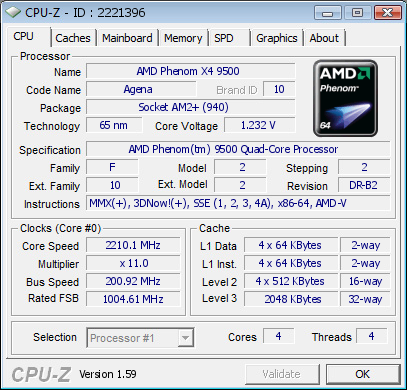
I am running a phenom 9500 and the zevenzero guy never posed back after he said he got a black screen running the same chip...

can anyone verify that the 9500 should *technically* work with the P61PM?
find
quote
@Ruckusist - I've heard that the MCP61PM-GM 2.4 works with the Nettle3 board modification, i'm not sure if the nettle2 modification is the right one for you, I'd look at the nettle3 thread first.

@BIOS_Downgrade - You may need to clear the red jumper on the motherboard even though HP says not to and labels the blue jumper. What BIOS commands did you use to flash?

P.S. - There is a fan fix if you follow the fan rewiring method I posted a while back.

TheWiz
www find
quote


Forum Jump:


Users browsing this thread: 4 Guest(s)